A URL shortener's job changed in 2026 — so I moved it into the AI chat
Contents
You hit send on the email blast. Forty thousand inboxes. Then someone notices the campaign link points at last quarter’s landing page.
There’s no undo. The email is already out. The link is baked into every copy.
The first time that happened to me, I learned what a URL shortener is actually for. It’s not a vanity tool for making links pretty. It’s an undo button for URLs you’ve already let go of — a layer of indirection between the address you handed out and the destination you can still change.
This is a story about how a humble short-link tool earns its keep, and then about the question that actually changed how I built mine in 2026: how do you make a utility reachable from inside the AI tools your users now live in? By the end I’ll lay out the two ways I found to do that — an MCP server versus an open API — and when each one is the right call.
The boring problems short links quietly solve
I didn’t set out to build a product. My team made websites, and short links kept turning out to be the cheapest fix for a class of small disasters:
- UTM parameters are a visual disaster. A tracked campaign URL is a hundred characters of
?utm_source=...&utm_medium=.... You can’t print that on a page, a slide, or a banner. A short link hides it. - Campaign links rotate. The promo points at one page this month, another next month. On a web page, swapping it is mildly annoying. In an email or a printed flyer, it’s unfixable — unless the link is one you control and can re-point after the fact.
- CDN caches lag. We’d ship a PDF or a deck for download, then catch a typo. You can overwrite the file at the same path, but anything behind a CDN cache keeps serving the stale copy for a while. Point people at a short link instead, and you swap the destination instantly — no waiting on a cache to expire.
The throughline is the same in every case: a short link is a layer of indirection you own. Once you see it that way, you start reaching for it constantly.
Around the same time, QR codes went from “airport novelty” to everywhere. And a QR code is just a short link in a different costume — same indirection, scanned instead of clicked. So I gave every short link its own QR page with the simplest mechanism I could think of: add /qr to any link and you get a printable code that still points wherever you re-point the link. It’s a small thing, but I liked how it fell out of the same idea — the link is the stable handle, the QR is just another way to hand it out. (Most shorteners offer QR in some form; this was just the cleanest way I found to wire it in.)
So I built my own
I’d been using the free tiers of the usual shorteners, and they kept fencing things off — the features I actually wanted drifting behind plans, or capped in ways that didn’t match how I worked. So I did the thing developers do: I built my own. The goal was modest — something more usable than the free options, with paid tiers that carve out the features that genuinely matter rather than nickel-and-diming the basics, at a price that felt fair.
With AI as a pair, it came together fast, mostly tracing the contours of my own experience. I knew exactly which small disasters I wanted it to prevent, because I’d lived all of them.
The correction I didn’t see coming
Then I launched it, and reality corrected me.
I’d built a tool for me — a person who shortens links to keep websites and downloads sane. But the people who lean hardest on short links today are marketers. Tracking, campaigns, social previews, the analytics that tell them whether any of it worked. I’d shipped a developer’s idea of a shortener into a market that mostly wanted a marketer’s.
So I retooled: social-preview controls so a shared link looks right in a feed, deeper click analytics, branded domains. The core was solid; it just needed to meet its actual users where they were.
The 2026 question
With that fixed, the harder question showed up: what makes mine different?
Not different in a feature checklist. Different in a way that matters. I looked at how I actually worked, and how the people around me worked, and the answer was sitting in plain sight: more and more of the work now happens inside an AI conversation. We draft, plan, and ship in a chat window. Switching out to a dashboard — any dashboard — to do one small thing has started to feel like friction it didn’t used to.
So here’s the bet I landed on. A URL shortener in 2026 should let you shorten a link, and do the work around it, without leaving the AI tool you’re already in. Not as a gimmick. As table stakes.
That’s the direction I finally felt was worth digging into. And making it real came down to a single technical question.
The lesson: how to make a tool reachable from an AI agent
If you want your utility callable from inside AI tools, there are two doors. I ended up building both, because they serve different people.
1. An MCP server. The Model Context Protocol lets an AI agent discover and call your tool directly. The user adds your server once; from then on the tool just appears inside Claude, ChatGPT, Cursor, Cline, and the rest. Auth is OAuth, so there’s no API key floating around in a chat transcript. This is the door for people who work in the conversation — a marketer in Claude, a developer in Cursor — who want to say “shorten this” and have it happen.
2. An open REST API. The classic door. A key, an endpoint, full control. This is for scripts, CI pipelines, and code-executing agents that aren’t sitting in a chat window — automation that wants to call you a thousand times without a human in the loop.
The tradeoff, side by side:
| MCP server | Open REST API | |
|---|---|---|
| Who it’s for | People working inside an AI chat (marketers, devs in agentic IDEs) | Scripts, CI, code-exec agents |
| Auth | OAuth — nothing secret in the transcript | API key you manage |
| Setup | Add the server once; tool auto-appears | Create a key, wire up requests |
| Best at | Zero-friction, in-conversation, one-off actions | High-volume, programmatic, fully controlled |
| Weak at | Heavy automation, fine-grained control | Anything a non-developer should never have to touch |
What did the MCP side actually take? Less than you’d fear and more than a weekend. A hosted, remote server (so users don’t install anything), OAuth so credentials never land in a prompt, and — deliberately — a single tool: shorten_url. One verb, done well, beats ten half-wired ones an agent can’t choose between. (The build details are their own post; here the point is the decision, not the plumbing.)
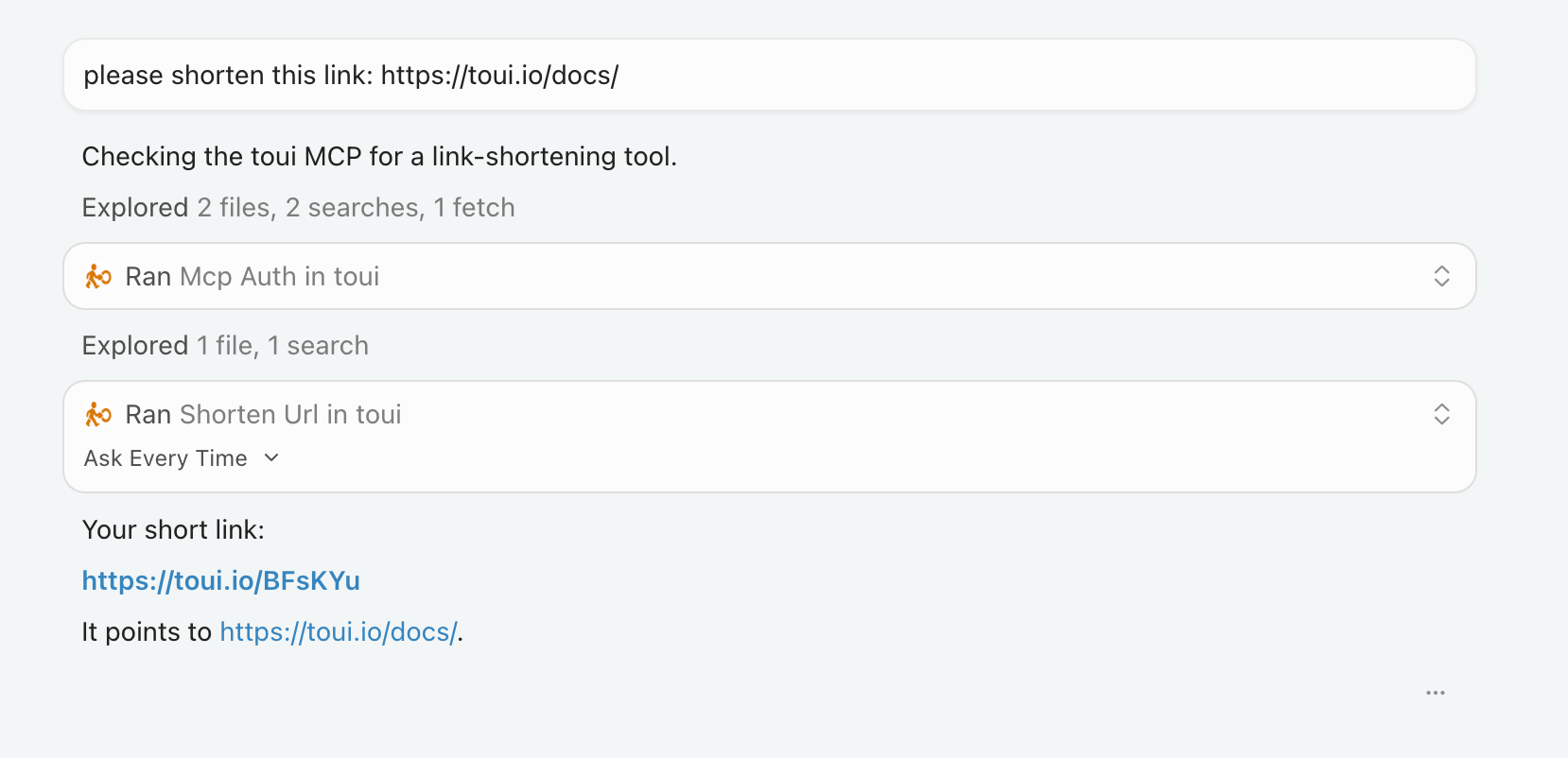
And it works. Here’s toui live inside Cursor: I ask it to shorten a link, the agent calls toui’s shorten_url tool, and hands back a real link — toui.io/BFsKYu — without anyone leaving the editor:
I also published the server to the MCP registries, so it shows up where you’d go looking for one. I’m not the first to take a tool this way — plenty are heading in the same direction — and that’s fine. Being early to your own product’s obvious next step is enough.
What I actually took away
The reframe that stuck with me, and the reason I’m writing it down: in 2026, whether your tool can be called from inside the agent is part of the product — not an integration you bolt on later.
The dashboard isn’t going away. Sometimes you want the full console, the bulk editor, the charts. But it’s no longer the only front door, and for a growing share of users it’s not the first one they reach for. The first one is the chat they already have open.
A URL shortener is about as humble a utility as they come. If its job has quietly changed this much — from “a tab you open” to “a thing your AI can just do” — it’s worth asking the same question about whatever you’re building.
I build toui.io, the shortener I used as the guinea pig for all of this. If you want to poke at the MCP side, it’s a paste-the-URL connector — but this post isn’t really about that. It’s about the question. Ask it about your own tool.