Update: add + to a toui link to see where it goes before you open it
Contents
When you’re about to open a short link, the worry is usually that the address itself doesn’t tell you where it goes. You can now check a toui short link before you open it. Add a ”+” to the end and open that instead, and you’ll see an info page for the link.
How to check
Say you’ve been sent toui.to/yjaDUe. Open toui.to/yjaDUe+ instead. It works for links on toui.io, toui.to and touitry.link, and you don’t need to log in.
What the info page shows
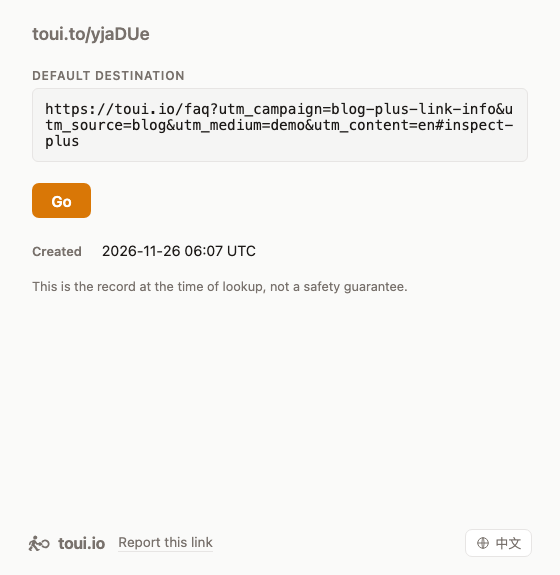
- Default destination: the full URL, including any parameters after it, exactly as stored.
- Created
- Destination or routing last changed: a toui link’s destination can be changed after it’s created, so the creation time alone isn’t enough. Links that have never been changed don’t show this line.
- Device or region routing note: some links send iPhone, Android or visitors from different countries to different URLs. The page lists only the default one and notes that the link goes to different URLs by device or region.
- Days until it expires: shown only for links created without logging in.
The page also says “This is the record at the time of lookup, not a safety guarantee.” toui checks every link for malware and phishing sites when it’s created, but sometimes you’ll still want to look at the destination and decide for yourself whether to open it.
Short links from other services
If the short link in front of you isn’t a toui link, some services have their own way to check.
- Bitly: add a ”+” to the end, the same way.
- TinyURL: add
preview.before the domain, sopreview.tinyurl.com/followed by the original code. - is.gd: add a ”-” to the end.
What each page shows differs. Bitly, for example, lists the full destination and when the link was created.
If you care about your click counts
Opening the ”+” page doesn’t count as a click. People who check a link before opening it won’t add to the click count you see in your dashboard.
Disabled or deleted links
For a link that has been disabled or deleted, the info page doesn’t show where it used to go. It only tells you the link is disabled.
A deleted code is never issued to anyone again, including the person who created it. A toui link you posted in the past won’t one day be taken over by someone else and pointed somewhere else.